In the realm of enterprise information security, cyberattacks and data breaches have been a major focus, with most defensive strategies centered on identity verification, access control, and perimeter security. Yet, a substantial number of real-world data breach incidents, attacks are not always carried out through the network. Instead, a significant portion of security risks actually comes from often-overlooked scenarios—endpoint devices or storage media being acquired by unauthorized hands.
If an employee loses a laptop during a business trip, or a server hard drive is removed from the data center during maintenance. This raises a critical question: When the device is powered off, disconnected from the network, and the operating system is in inactive, is the data stored on it actually secure?
Against this backdrop, enterprises are paying increasing attention to the security of data at rest. As a result, Self-Encrypting Drives (SEDs) have emerged as a significant technology in the field of protecting static data.
What Is a Self-Encrypting Drive?
A Self-Encrypting Drive (SED) is a storage device—either a hard disk drive (HDD) or a solid-state drive (SSD)—with built-in encryption capabilities. In simple terms, when data is written to an SED, the drive automatically “locks” the data through encryption. When a user accesses the data through normal, authorized means, the drive automatically “unlocks” it. This entire process takes place internally within the drive and is almost completely transparent to both users and the operating system.
At its core, the idea behind SEDs is not to rely on software to decide whether data should be encrypted, but to make encryption the default state of all data from the very beginning.
How Self-Encrypting Drives Work
The key to SED's "automatic encryption" capability lies in its integration of encryption directly into the storage device itself, rather than relying on the operating system or additional encryption software.
The basic workflow is as follows:
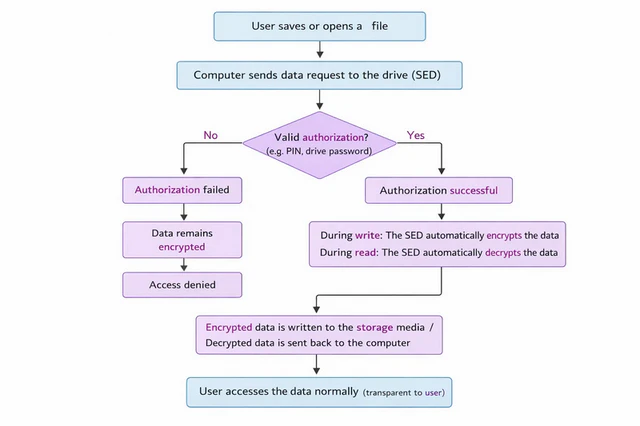
When a user saves or opens a file, the computer sends the data request to the drive. The SED first checks whether valid authorization has been provided (such as a PIN or drive password).
- During write operations, the SED encrypts the data internally within the drive before writing it to the storage media.
- During read operations, the SED automatically decrypts the data is only after successful authentication, then transmits the decrypted original data to the computer for normal use.
- If authorization fails, the data remains encrypted at all times and is inaccessible or unreadable.
Furthermore, the encryption keys used by an SED are generated and stored by the drive itself, typically within a secure internal area. These keys are never exposed to in plaintext to the operating system or the user. When the device is powered off, locked, or has not passed authentication, the encryption keys cannot be accessed. Even if an attacker physically removes the drive and attempts to read its raw data directly, they will only encounter indecipherable encrypted content.
SED vs. Software-Based Encryption
In practice, SEDs are often compared with software-based encryption solutions. The fundamental difference lies in where the encryption takes place:
- Software encryption operates at the operating system level and relies on system login and CPU processing.
- SED encryption operates at the hardware level and is transparent to the operating system.
This difference leads to several practical implications:
| Dimension | SED | Software-Based Encryption |
|---|---|---|
| Encryption location | Inside HDD / SSD hardware | Operating system level |
| Performance impact | Minimal, almost no impact | Depends on CPU, may affect performance |
| User involvement | Nearly transparent | Requires software installation and configuration |
| Key management | Securely stored inside the drive | Managed by OS or software |
| System dependency | Works independently of OS | Requires OS or encryption software |
| Data destruction | Instant secure erase by destroying keys | Full disk overwrite or specialized tools |
Real-World Benefits of Self-Encrypting Drives
From a security management perspective, the value of SEDs is mainly reflected in the following areas:
1. Data-at-Rest Protection
The most immediate advantage of SEDs is protecting data stored on devices while at rest. Whether a device is powered on or off, or a server is online or offline, as long as access is not authorized, the data on the disk remains encrypted. Additionally, the encryption keys are stored within the hardware of the drive and cannot be directly accessed from the outside. Even if the hard drive is physically removed and connected to another device, the data cannot be read without verification of the key, significantly reducing the risk of key leakage.
2. Operational and Management Efficiency
SEDs are transparent to endpoint users and do not require employees to install or operate complex encryption software. IT administrators also save extensive time training users or worrying about encryption being disabled or bypassed the encryption mechanism. This greatly improves operational efficiency and reduces security risks caused by human error.
3. Efficient Data Disposal
In scenarios such as enterprise device retirement or replacement, traditional data sanitization methods require overwriting the entire hard drive, which is time-consuming and error-prone. SEDs enable instant secure erase by destroying the drive's encryption keys, rendering all data permanently unreadable. This simplifies device decommissioning while maintaining a high level of data security.
4. Compliance Support
In industries such as finance, healthcare, and government, regulations and standards often mandate encryption for data at rest. By providing hardware-level encryption, SEDs help enterprises easily meet legal and industry compliance requirements, such as those under GDPR, ISO 27001, and other relevant standards.
Limitations and Considerations of SEDs
While SED offers clear advantages for protecting data at rest, it is not a universal solution and does have certain limitations.
1. Key Management Risks
The encryption key stored within the hard drive is the only way to decrypt the data. Once the key is lost, the data becomes permanently inaccessible. If an centralized management system is compromised, leading to key exposure, data security will be affected. Therefore, although SEDs provides strong protection, they rely on secure key management and protective measures.
2. No Protection for Data in Use
SEDs primarily protect data during the storage phase. When a device is powered off or locked, the data remains encrypted and unreadable. However, SED has a critical shortcoming: it cannot protect data in use. If a file is modified, deleted, or transferred externally, SED cannot recognize or block these actions. Thus, in real-world enterprise environments, SED is not suitable as a standalone solution. Instead, it should serve as the foundational encryption capability for data at rest, deployed in conjunction with endpoint data loss prevention (DLP) and user behavior management solutions.
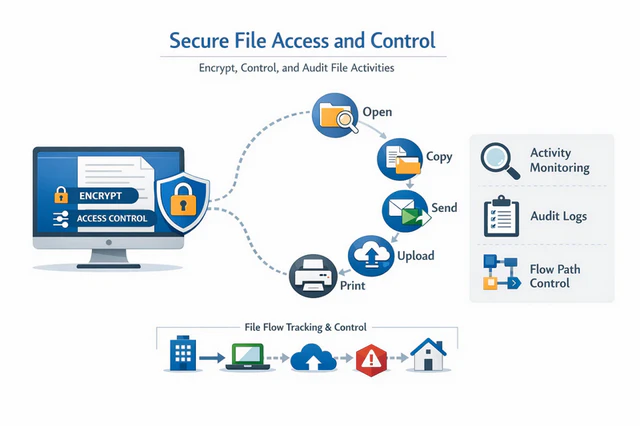
For example, AnySecura’s encryption and endpoint management features can effectively address this gap by enforcing real-time encryption and policy controls throughout the data lifecycle. Operations such as file opening, copying, sharing, uploading, and printing can be continuously protected and audited. Even when data is in use, unauthorized endpoints can only access unreadable encrypted content. This effectively guards against data leaks caused by malicious attacks or insider misuse. Additionally, AnySecura provides comprehensive auditing of endpoint file operations, enabling organizations to swiftly trace the source and identify responsible parties in the event of a data breach.
3. Compatibility Considerations
Some legacy operating systems or specialized applications may not fully support hardware-based encryption. If the system or application cannot properly recognize an SED, access issues may occur. Therefore, compatibility testing is essential before deployment, especially in large-scale enterprise environments.

Compare top endpoint management software in 2026, including Intune, Workspace ONE, ManageEngine, Ivanti, and AnySecura, for secure device management and DLP. Learn more>>
Conclusion
In summary, Self-Encrypting Drives do not make encryption more complex ; rather, they bring encryption closer to the data itself. They do not require users to learn new operations, nor do they depend on whether users “enable encryption”. Instead, encryption becomes a default attribute of the storage device.
More importantly, SEDs are not isolated security tool. They can serve as the foundational layer of an enterprise data security framework, working alongside endpoint management, data loss prevention, and auditing solutions to protect data throughout its entire lifecycle from storage to active use.
As data continues to grow in value and regulatory requirements become more stringent, Self-Encrypting Drives are evolving from an optional feature into an essential component of modern enterprise storage and endpoint security strategies.