Employee monitoring software plays a crucial role in improving productivity, protecting sensitive data, and ensuring compliance across departments. However, with so many monitoring tools available, finding the right one can be challenging. Each platform has its own strengths, some focus on productivity tracking, others on data loss prevention or insider threat detection. The right choice depends on your company’s size, industry, and security needs.
This article reviews five leading employee monitoring software in 2026, AnySecura, Teramind, ObserveIT, We360.ai, and Spyrix. We’ll break down their features, hands-on impressions, pros and cons, and pricing to help you quickly identify which software best fits your organization.
Which Employee Monitoring Software Is Right for You?
If you don't want to spend time understanding the features of all products, you only need to answer the following simple questions to immediately find the employee monitoring software that best suits your business out of these 5 programs.
Best Employee Monitoring Software for you: AnySecura
We matched your answers to the option that best fits your needs.
Product Features
The product description will be displayed here.
Top 5 Employee Monitoring Software in 2026
Here is a complete review of the top-rated employee monitoring software on the market. Follow this guide to choose the best fit for your business.
Teramind
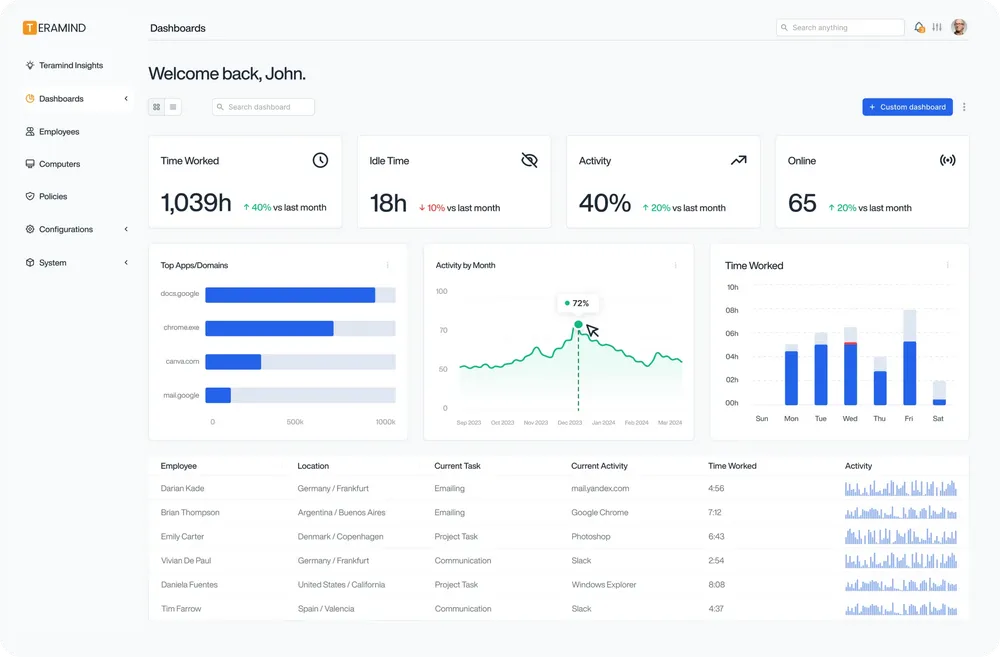
Teramind is a popular employee monitoring software known for its UAM (User Activity Monitoring) and DLP capabilities. It monitors websites, applications, file activity, emails, IM, printing, online meetings, and even geolocation, giving managers a full picture of user activity. You can also view live screens and replay historical activity for investigations. The dashboard comes with ready-made widgets like “Top Performers” and “Most Used Browsers,” making it easy to spot trends before problems grow.
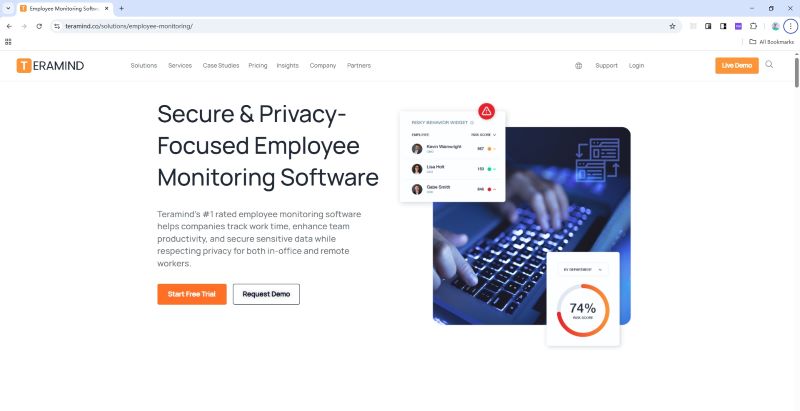
The Core Value of Teramind:
- Screen & Audio Recording: Monitor employee emails to prevent data leaks, ensure compliance with company policies, and protect sensitive information.
- Optical Character Recognition: Track instant messages and conversations to gain insights into team communication and collaboration, and ensure compliance.
- Website / Application / Email / Instant Message / Social Media / Network Monitoring: Monitor employee behavior, track time spent and identify potential security risks with detailed monitoring on your endpoints.
- Citrix/Session Hosts Monitoring Citrix: Monitor employee activity within Citrix, terminal servers, RDP or virtual environments. Track application usage and ensure data security with specialized monitoring on your endpoints.
- Remote Desktop Control: Take control of remote employee computers in real-time to provide support, troubleshoot issues, or prevent data breaches and insider threats.
- RDP Session Recording: Record RDP sessions to gain a comprehensive understanding of user activity, troubleshoot technical problems, and ensure compliance.
- Productivity Analysis: Analyze employee productivity with detailed metrics, identify areas for improvement, and boost productivity across your team members.
- Active Vs. Idle Time Logs: Track active and idle time to understand how employees spend their work hours and optimize time management and productivity.
- Unproductive Work Time Analysis: Identify unproductive work time, analyze patterns, and implement strategies to improve efficiency and time management.
Hands-on Impressions
Getting started is surprisingly easy, great for small and mid-sized businesses. The built-in templates and compliance rules cut down on setup time. However, the dashboard initially displays over 10 widgets (e.g., "Top Performers," "Most Used Browsers," "Risk Alerts"), which can feel overwhelming for non-technical users. After customizing filters and hiding unnecessary widgets, it becomes a powerful command center. However, after hiding irrelevant widgets and customizing filter logic (e.g., filtering by department or time range), it transforms into a intuitive command center.
A standout feature is the "jump to video from event log"—clicking on a suspicious file transfer or website visit instantly pulls up the corresponding screen recording, eliminating the need to sift through hours of footage. However, since it continuously records screens, you’ll need to plan for extra storage and bandwidth.
Pricing & Best Fit
On Capterra: Starter around $168/user/year, UAM around $336, and DLP (cloud) around $384. It’s an excellent value for businesses wanting fast deployment and polished dashboards. But, advanced DLP and on-prem versions can be costly, which fits better for organizations scaling up their security programs.
 Pros:
Pros:- Rich dashboards and detailed activity tracking
- Easy onboarding and prebuilt compliance templates
- Live monitoring and video playback for investigations
Cons:- High storage requirements for continuous recording
- Complex interface at first for non-technical users
- Advanced features come with additional costs
👍 Best for
Medium to large companies that want strong insight into user activity and need both productivity tracking and insider threat detection in one system.
AnySecura
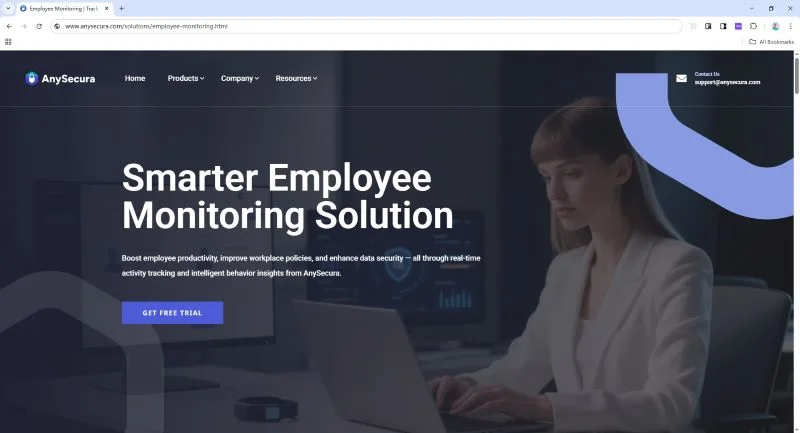
AnySecura integrates employee monitoring, encryption, and IT asset management—differentiating itself from basic trackers by focusing on proactive data leak prevention. It monitors websites, apps, emails, IMs, print jobs, clipboard activity, removable media, and even phone unlock attempts. This employee monitoring solution also includes flexible screen recording settings and powerful audit tools. It adds features like watermarking and transparent encryption to keep sensitive data safe, even when it leaves your network.
The Core Value of AnySecura:
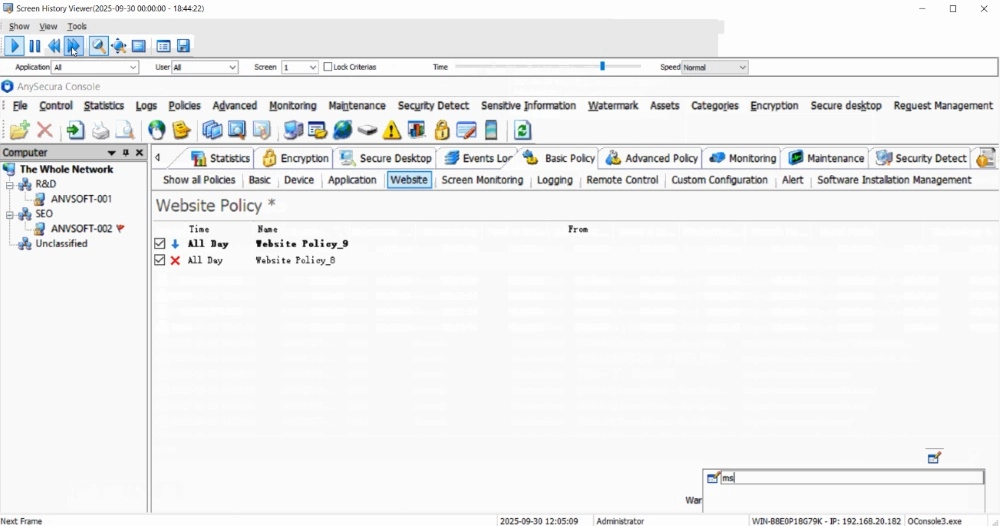
- Live View & Screen Recording: Record screen activities to capture critical events and support compliance audits or investigations, Supports search and export; view by app or user; each frame includes timestamp, user, app, and window title; export frames as images.
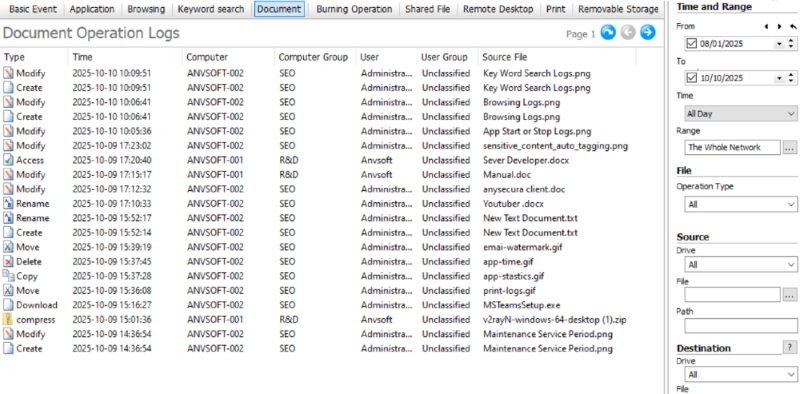
- User Activity Monitoring: Offer detailed logs of user activities including system policies, device control, app control, web browsing, network traffic, email, IM file transfer, uploads, document operations, printing, removable storage, and software installation.
- Comprehensive Report System: Lets you combine different conditions, view results with charts and tables, and track how things change over time. It even supports custom dashboards, so you can decide exactly what data to see. Reports can also be scheduled, daily, weekly, or monthly, and once set up, they run automatically. You can pause or delete them at any time. This means managers can always access the exact insights they need.
- Alert System: Defines severity so managers can prioritize. Alerts are delivered via Internal software windows, pop-up bubbles, and email notifications.
- Endpoint Control: Set policies to manage and restrict use behaviors to ensure productivity and prevent data leaks..
Hands-on Impressions
Using AnySecura makes it clear this tool prioritizes "actionable visibility" over mere data collection—unlike basic trackers that just log time spent on apps. For example, when an employee copies a sensitive Excel file to a USB drive, the system not only logs the action but also flags it with a risk score and triggers a real-time alert (via email and in-app notification) with context: file name, USB device model, and even a screenshot of the operation.
The custom reporting feature is particularly powerful: we built a dashboard to track "printing activity by department" and scheduled weekly auto-deliveries, which helped identify a team overprinting confidential documents. The screen recording settings are flexible too—you can set it to record only when specific apps (e.g., Outlook, Slack) are active, or capture 10-second clips every 5 minutes to save bandwidth.
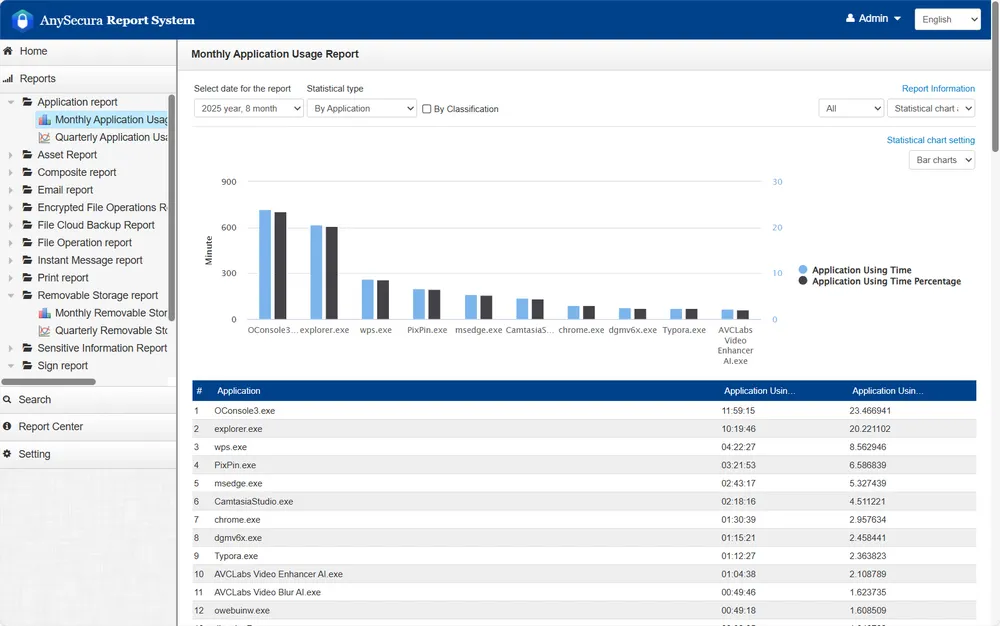
While the interface is less visually polished than Teramind (fewer color-coded charts, more text-based logs), it’s highly functional: all critical data (e.g., device activity, encryption status) is organized in a left-side navigation menu, making it easy to switch between monitoring, alerts, and reports. The only minor friction is the initial policy setup—configuring USB access rules and encryption exceptions requires some familiarity with IT security concepts, so small teams may need to allocate 1-2 hours for training.
Pricing & Best Fit
Starts around $216/user/year. It’s on the higher side, but you’re getting four tools in one: monitoring, DLP, encryption, and asset management. That makes it ideal for regulated industries like finance, healthcare, or R&D, where data protection and compliance matter most.
Pros:- Comprehensive security with monitoring + encryption
- Real-time blocking and customizable approvals
- Privacy-conscious design without invasive methods
Cons:- Higher learning curve for new users compared to Teramind or We360.ai
- Less visual dashboard compared to Teramind
- Premium pricing may be a barrier for small businesses with limited budgets
👍 Best for
Organizations that handle sensitive or confidential data, such as banks, hospitals, or research companies, and need a balance between compliance, visibility, and control.
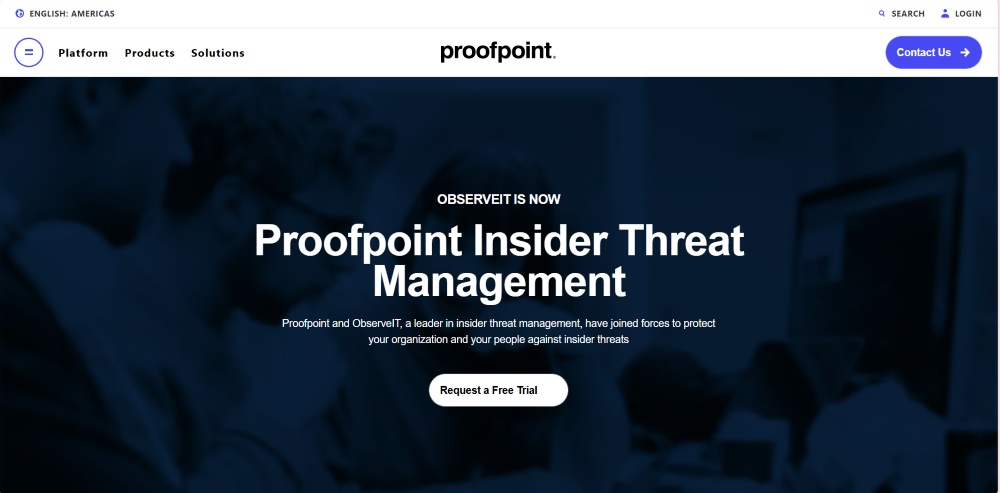
ObserveIT (now Proofpoint Insider Threat Management)
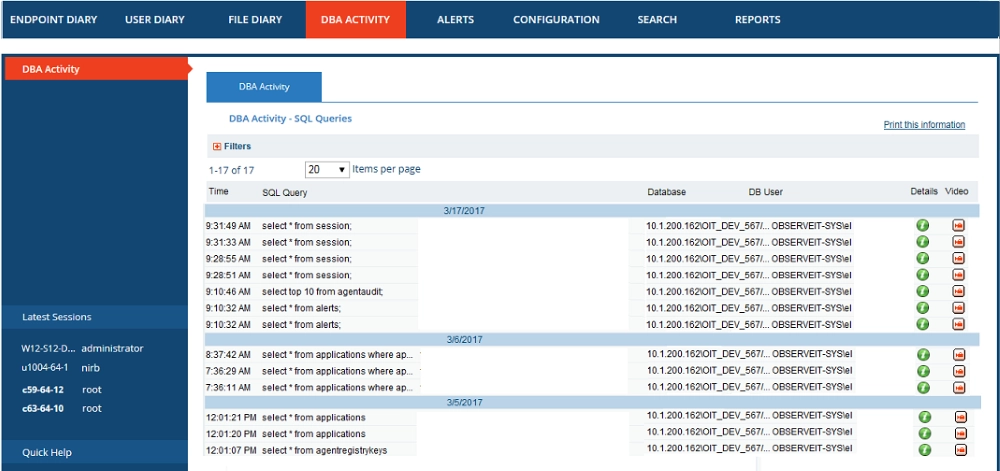
ObserveIT is another powerful employee computer monitoring software that focuses on insider-risk analytics and detailed audit trails. Instead of directly blocking file actions, it monitors and analyzes user behavior to identify risk patterns. Every action, from file access to SQL commands, is logged and assigned a dynamic risk score. This approach gives security teams deep visibility into who did what and why, helping them focus on high-risk behaviors instead of drowning in logs.
The Core Value of ObserveIT:
- Behavioral Monitoring: Tracks logins, file actions, app and web use, plus sensitive operations like key inputs and SQL commands across endpoints.
- Real-Time Alerts: Uses an Insider Threat Library and custom rules to flag risky activity right away and show clear on-screen warnings.
- Forensic Audit Trails: Creates detailed, time-stamped records and session captures so investigators can review what happened step by step.
- Session Replay & Screens: Supports live viewing and historical screen review to analyze incidents and coach users based on real evidence.
- Guided Policy Response: Can warn users or, on supported systems (e.g., Linux/Unix), terminate risky processes or log off a user to reduce harm.
- Compliance Reporting: Offers configurable reports and email delivery to document activity, alerts, and policy events for audits.
- Team Awareness & Training: Emphasizes risk awareness and behavior coaching, helping organizations correct issues before data loss occurs.
Hands-on Impressions
Using ObserveIT feels like operating a digital forensics tool tailored for enterprise security teams. It’s designed primarily for post-incident investigations, and this focus shines through in its workflow: when a data breach is reported, you can search for the user’s activity by time, action (e.g., file download, SQL query), or risk score, and pull up a minute-by-minute audit trail with timestamped screenshots and keystroke logs.
The Insider Threat Library provides pre-built rules, which are great for teams without large security staffs. On Linux systems, the tool offers limited real-time intervention: we tested a scenario where an employee ran a suspicious script, and the system terminated the process within 3 seconds of triggering the rule. However, on Windows/macOS, it’s purely observational—you can’t block actions in real time, only log and alert. The biggest downside is the report design: most reports are table-heavy (no interactive charts), so analysis often requires manual effort and a trained eye.
Pricing & Best Fit
Capterra lists a one-time $2,400 per-user basic license. This puts it in the category of high-end enterprise tools, suited for governments or large corporations that require in-depth audits and forensic-grade visibility.
Pros:- Excellent for forensic investigations and risk scoring
- Comprehensive activity logs with detailed context
- Strong library of predefined insider-threat rules
Cons:- Limited real-time prevention and blocking
- Heavily data-driven and less visual interface
- High cost limits accessibility for smaller businesses
👍 Best for
Large enterprises and government organizations that need deep behavioral auditing, compliance evidence, and insider-risk analysis rather than everyday productivity tracking.
We360.ai
We360.ai is a cloud-based employee monitoring software and productivity management platform developed in India. Unlike security-focused software, it emphasizes performance visibility over surveillance. It offers time tracking, app and website classification, productivity scoring, task and project management, location tracking, and even goal setting. Its AI engine summarizes performance trends, team health, and engagement levels to help managers balance workloads efficiently.

The Core Value of We360.ai:
- Application and Website Usage: Provides insights into how employees use various applications and websites during their working hours.
- Alerts: Stay instantly informed about important employee activities with a clear, easy-to-read alert log.
- Livestream: See what employees are working on in real time with a tile view showing current apps/URLs and live status like active, idle, or offline.
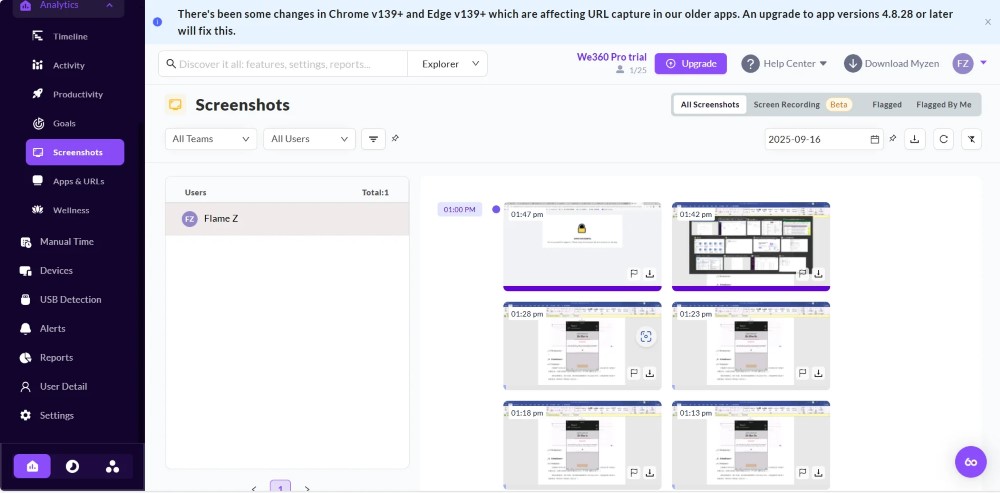
- Screen Recording: Screen Recording captures 5-min sessions (1 fps) with activity %, app/URL, clicks, and keypresses, kept for 7 days.
- Keyboard and Mouse activity: Monitor real-time keyboard and mouse activity to measure employee engagement levels and identify active, idle, or offline states.
- Domain Blocking: Restricts access to specific websites during work hours to ensure focus and prevent distractions.
- Devices: It provides a detailed and insightful overview of the devices utilized across your organization, encompassing both PCs and mobile devices
Hands-on Impressions
The dashboard feels friendly and intuitive, showing online time, idle time, and attendance all in one view. It’s ideal for team leads who want an overview without micromanaging. The built-in project and task modules allow assigning work, tracking progress, and managing deadlines seamlessly. However, the monitoring depth is limited for security needs: it can’t track file transfers, USB usage, or email content—only app/website time and basic keyboard/mouse activity. The blurred screenshot feature is a nice privacy touch, but it means you can’t verify if an employee is actually working on the app they’re logged into (e.g., they could have Slack open but be browsing social media in a hidden tab).
Pricing & Best Fit
The employee computer monitoring software offers a Free Plan (up to 3 users), Starter plan at around $60/user/year, and Pro plan at $84/user/year, with enterprise pricing available upon request. It’s perfect for SMBs that care more about time optimization and engagement tracking than strict compliance or insider threat prevention.
Pros:- Modern, easy-to-understand dashboards
- Includes task and project management modules
- Affordable pricing with free-tier option
Cons:- Limited in-depth monitoring for files or devices
- No strong DLP or compliance features
- Depends entirely on internet connectivity
👍 Best for
Small to mid-sized businesses focused on team productivity, attendance, and remote workforce visibility rather than strict IT governance or data security.
Spyrix
Spyrix started as a home-use and parental monitoring tool and later expanded to a business edition. It includes screen recording, keylogging, clipboard capture, and even audio or webcam monitoring. While this breadth of coverage sounds appealing, it also raises serious privacy and compliance concerns. It lacks deeper enterprise features like file auditing, workflow analysis, or data classification, so its visibility is broad but not strategic.
Want to know more about Spyrix, please refer to: AnySecura vs Spyrix Comparison 2026: Features, Pros, and Cons
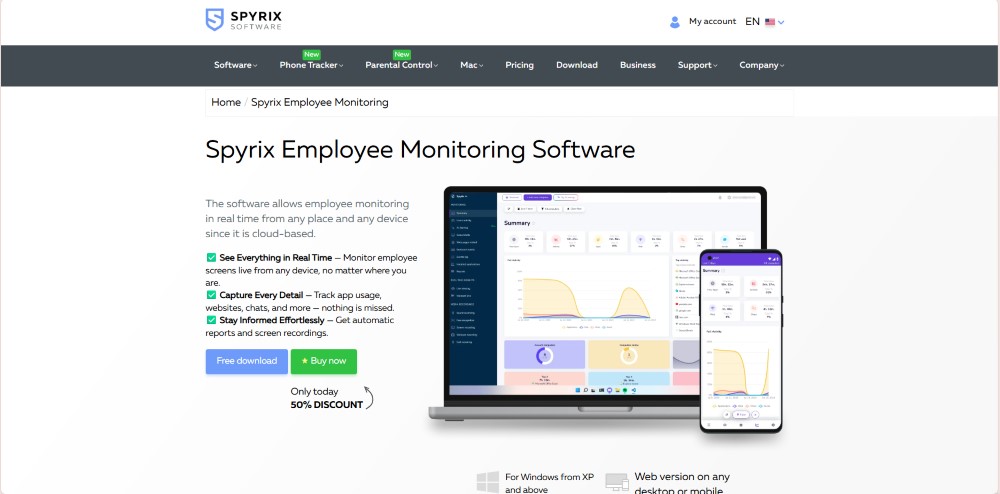
The Core Value of Spyrix:
- Monitor web activity: Track what websites a user visits and for how long.
- Track application usage: Log which programs are opened/used on the computer, helping see how time is spent.
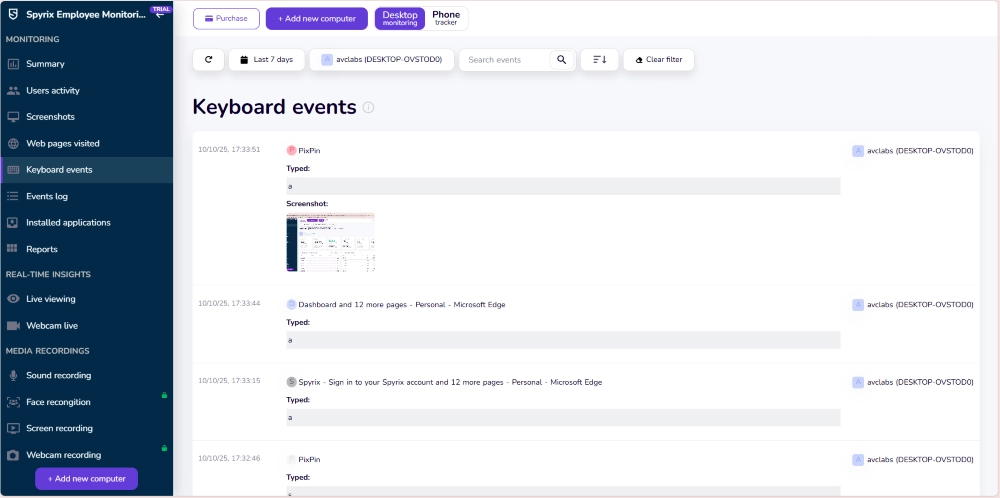
- Keystroke logging and clipboard tracking: Record what the user types (keystrokes) and what they copy/paste.
- screenshots / screen recording: Capture periodic screenshots (or screen sessions) so you can see what’s displayed on the user’s screen.
- Webcam / microphone monitoring: Record webcam video and audio (listen via mic) from the monitored device.
- Remote control: Monitor user devices remotely, even control devices or view them from afar.
- Support for multiple devices: Support monitoring multiple devices (e.g. in a business) across Windows/macOS.
- Productivity monitoring: Give managers (or parents) data on how much time is spent on what tasks, to gauge productivity or detect distractions.
This step-by-step remote work setup guide will show you how to build a secure remote work environment for business. Learn more>>
Hands-on Impressions
Spyrix captures almost everything, from keystrokes to clipboard actions, giving administrators a raw view of user behavior. You can even record webcam and microphone activity, but this can feel invasive and may not align with corporate privacy standards. The user interface is basic and reports are minimal, so it requires manual digging to find relevant insights. While it technically works in office setups, its design and data granularity make it more practical for parental control or personal use.
Pricing & Best Fit
Capterra lists its business edition at around $149/user/year. Considering the invasive data collection and limited reporting features, it’s not a strong choice for professional environments. It may be more suitable for very small teams or personal computer monitoring.
Pros:- Captures nearly every detail of user activity
- Simple setup and installation
- Offers webcam and microphone recording for full visibility
Cons:- Highly invasive, potential privacy and legal concerns
- Lacks enterprise-level analytics and dashboards
- Limited correlation between activity and productivity outcomes
👍 Best for
Home users, freelancers, or very small teams needing basic computer tracking and not subject to corporate compliance requirements.
Which Monitoring Employee Software Fits You?
1. Monitoring Depth & Compliance
- AnySecura ⭐⭐⭐⭐⭐: Offers comprehensive monitoring coverage (websites, apps, emails, clipboard, USB drives, printers, document operations) + DLP features (transparent encryption, watermarking). Ideal for organizations with strict compliance requirements, though the learning curve is steeper.
- Teramind ⭐⭐⭐⭐: Monitors websites, applications, file activity, emails, instant messages, printing, online meetings, and geolocation. While broad in coverage, it focuses on behavioral visualization and auditing rather than encryption or watermarking. It provides blocking and audit functions but lacks the deep logging level of AnySecura.
- ObserveIT ⭐⭐⭐⭐: Focuses on insider threat analysis, logging system events, file operations, and key activities to build risk scores. It doesn’t offer document encryption or print control and is mainly for investigation and traceability.
- We360.ai ⭐⭐: Functions more as a productivity analytics tool, tracking time, applications, websites, and task completion. It lacks deep monitoring for files, peripherals, and communications , better suited for teams focusing on efficiency.
- Spyrix ⭐⭐: Emphasizes keystroke logging, clipboard capture, screenshots, webcam, and audio recording. These may be useful in home settings but raise privacy concerns in corporate environments. It doesn’t record file or email activity.
Summary: AnySecura leads in monitor depth; Teramind and ObserveIT serve monitoring and risk analysis; We360.ai and Spyrix are not suitable for enterprise-grade DLP.
2. Real-Time Response & Automation
- AnySecura ⭐⭐⭐⭐⭐: Provides real-time blocking , automatically alerts or intercepts when employees plug in USB drives or access sensitive files. It can throttle or close non-work websites based on policy. Screen recording can be set per app and interval, stored long-term without affecting bandwidth.
- Teramind ⭐⭐⭐⭐: Offers real-time viewing and playback of user sessions. Supports alerts and policies but focuses more on analysis than automated blocking.
- ObserveIT ⭐⭐⭐: Mainly used for post-event audits. On Linux, it can terminate processes or log out users, but overall real-time defense is weaker.
- We360.ai ⭐⭐: Supports real-time screen and location view, with domain blocking that auto-closes disallowed sites after prolonged use. Automation is mostly in AI-based reporting and recommendations, not active security blocking.
- Spyrix ⭐⭐: Allows real-time viewing via screen, webcam, and microphone, but lacks enterprise-grade control automation.
Summary: AnySecura provides the strongest active defense automation; Teramind is strong for visibility; others lag in proactive controls.
3. Ease of Use & Scalability
- AnySecura ⭐⭐⭐⭐: Rich features with a moderate learning curve requiring security team setup. Offers multi-language support and free trial, with modular licensing that scales with business growth.
- Teramind ⭐⭐⭐⭐: Easy to install and start, includes many templates suitable for quick SMB deployment. Interface can be dense; admins may need to customize dashboards for optimal use.
- ObserveIT ⭐⭐⭐: Data presented mainly in tables; technical and best for enterprises with dedicated security teams. Deployment and usage costs are high for smaller organizations.
- We360.ai ⭐⭐⭐⭐: User-friendly interface with project management and goal-setting modules. Ideal for distributed teams; expansion comes from its SaaS and AI-based structure.
- Spyrix ⭐⭐: Very simple to use, but the interface and reports are basic, insufficient for enterprise analytics.
Summary: Teramind & We360.ai are easiest to start; AnySecura scales best for security-heavy orgs; ObserveIT suits mature security teams; Spyrix is too basic.
4. Pricing & Deployment
- AnySecura ⭐⭐⭐⭐: Higher-priced, with Professional, Premium, and Enterprise editions. The Professional version starts at around $216/year, while Enterprise adds transparent encryption, advanced auditing, and 24/7 support. Supports on-premises deployment, allowing long-term data retention and preventing vendor access to recordings.
- Teramind ⭐⭐⭐⭐⭐: According to Capterra, Starter costs $14/user/year, UAM $28, and Cloud DLP $32. Available in cloud and on-premises versions. Great value for teams wanting full functionality on a budget.
- ObserveIT ⭐⭐: One-time license fee around $2,400 per user, targeting large enterprises and government agencies.
- We360.ai ⭐⭐⭐⭐: Offers a free plan (up to 3 users); paid plans cost about $60–84/user/year. Affordable and scalable for small teams.
- Spyrix ⭐⭐: Around $149/user/year. Aimed at home monitoring, offering limited business value.
Summary: Teramind offers best ROI; We360.ai is budget-friendly; AnySecura is premium for security-critical needs; ObserveIT is costly; Spyrix lacks enterprise benefit.
Executive Summary: What Each Tool Does Best—and for How Much
| Software | Core Strength | Reference Price* |
|---|---|---|
| AnySecura | Deep monitoring, encryption, watermarking; real-time blocking and approvals | ~$216/user/year |
| Teramind | Polished dashboards, rich templates, live monitoring & behavior analytics | Starter ~$168/user/year |
| ObserveIT | Risk scoring, audit forensics, SQL/sensitive key monitoring | ~$2,400 per user, one-time |
| We360.ai | Productivity analytics, tasks/projects, attendance and AI summaries | Starter ~$60/user/year |
| Spyrix | Keylogging and A/V capture; more suited to home use | ~$149/user/year |
*Prices are indicative; actuals vary by region, seats, and promotions.
Bottom line: Across all four dimensions, AnySecura stands out for comprehensive protection, flexible auditing, real-time controls, and multi-language enterprise support.
FAQs about Employee Monitor Software
Q1: Is it legal to monitor employees?
It depends on your jurisdiction and company policy. In general, be transparent: disclose what you monitor, why, and how you handle data; obtain required consent. Tools heavy on keylogging or A/V capture (e.g., Spyrix) should be used with extreme caution.

Learn how to monitor employee internet usage legally and ethically and best practices.Learn more>>
Q2: Can these tools effectively track remote or WFH teams?
Yes. Most offer cross-platform agents and cloud consoles. Teramind supports geolocation and remote sessions; AnySecura supports on-prem with offline recording and enforcement; We360.ai includes mobile visibility for presence/location. Always balance monitoring with culture and privacy.
Q3: Can I try before I buy?
Typically yes. Teramind has a 14-day trial; We360.ai offers a free plan; AnySecura and ObserveIT provide demos or tailored trials; Spyrix also has a trial. During trials, stress-test monitoring scope, alert response, report output, and employee acceptance.
Conclusion
Choosing the right employee monitoring software is not just about tracking activity, it’s about finding a balance between visibility, control, and trust . Whether your goal is to improve productivity, ensure compliance, or prevent data leaks, the right tool can make your organization more secure and efficient.
We hope this guide helps you discover the platform that best matches your company’s goals and scale. If you’re looking for a comprehensive, security-driven solution that combines real-time monitoring, data protection, and powerful reporting, AnySecura is the clear choice.
Take control of your organization’s data security and performance today and experience hands-on protection for your business.